Incremental RTS Controls
Every essential input for factories, upgrades, camera, and browser caveats.
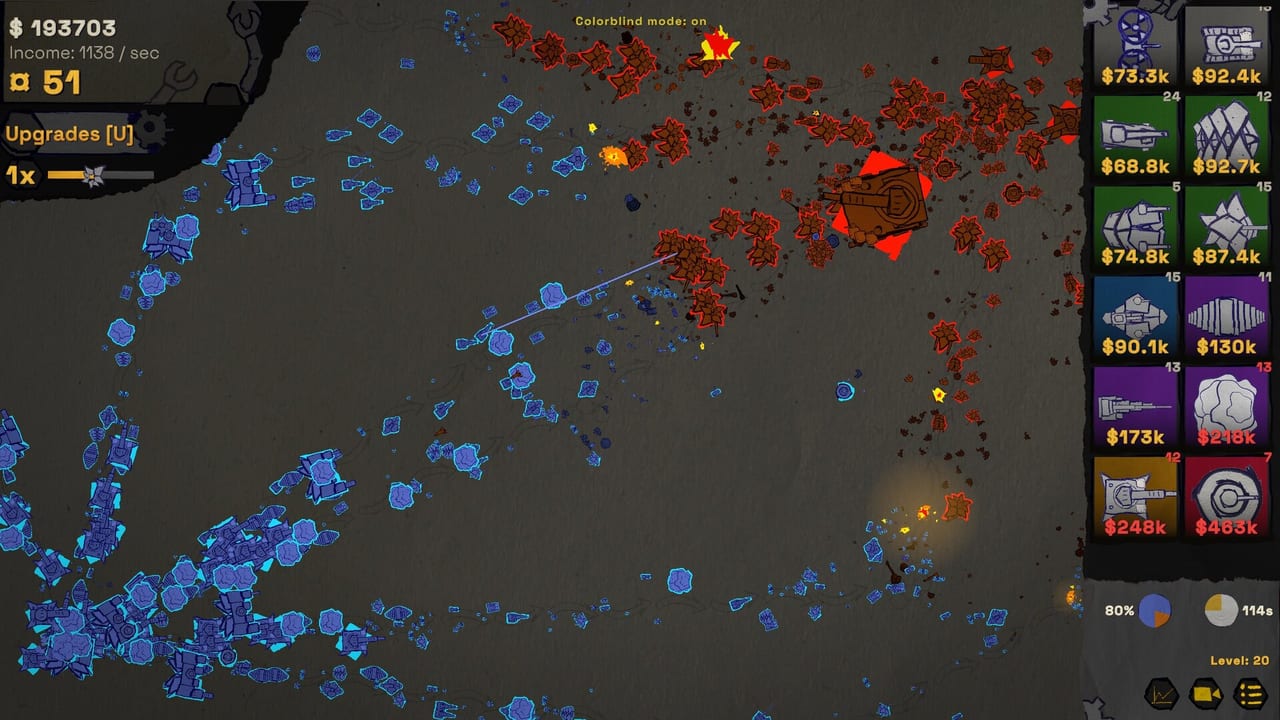
Incremental RTS keeps the input list short on purpose. You are not microing squads; you are steering an economy and upgrade machine while auto-battles resolve. Still, knowing the controls cold saves runs—especially when a surge hits and you need upgrades open, a multi-buy ready, and the camera on the collapsing lane.
This page matches the documented itch.io control notes and common desktop behavior for the Steam build that launched November 24, 2026. Always re-check the in-game controls menu after a large patch.
Core controls cheat sheet
| Input | Action |
|---|---|
| U | Open the upgrades panel |
| Left-side upgrades button | Same as U |
| Right factory panel | Buy factories for unit lines |
| Ctrl (Windows/Linux) / Cmd (macOS) held | Multi-buy factories |
| Mouse wheel or trackpad scroll | Zoom the battlefield |
| Hold mouse button and drag | Pan / navigate the map |
| In-game controls menu | Confirm platform-specific bindings |
Units produce automatically once factories exist. Units fight automatically. Your skill expression is timing purchases and choosing upgrade branches—not issuing attack-move orders.
Upgrades: U and the left button
Press U whenever you need the tree. The left-side button does the same job if you prefer mouse-only play. Opening upgrades is not documented as a full pause command—combat and production continue according to the build you are on—so do not assume the world freezes while you shop.
Inside the tree you will find structured categories, search-by-keyword improvements from the 2026 rework, apex highlights, and long chains that feed every archetype on the Army Builds page. For spending order theory, use the Upgrades Guide and Economy Guide.
Tips while the panel is open:
- Know what you came to buy before you open the tree.
- Prefer upgrades that multiply your current factory identity over random new branches mid-surge.
- After shopping, glance at income per second before the next factory click.
Factories and Ctrl / Cmd multi-buy
Factories live on the right panel. Each purchase increases production for that unit line. When income is high and prices are climbing, holding Ctrl or Cmd while buying lets you purchase multiple factories without repetitive single clicks.
Multi-buy is powerful and dangerous:
- Powerful when you have already decided Mosquito spam or Ant carpet is the plan.
- Dangerous when you still owe an upgrade that would double output—multi-buying the wrong line burns the bank.
Estimate waits with the Factory Calculator using max(0, price − balance) ÷ income per second. If the calculator says forty seconds and a cheap income upgrade would cut that in half, open U first.
Hidden quality-of-life: itch development mentioned a factory auto-buy option tied to typing clone in some builds, with fuller auto-buy planned for the complete game. Treat that as an advanced convenience, not a required mechanic, and confirm it still exists in your version.
Camera: zoom and pan
Late maps grow. Turrets on waypoints, lasers, block posts, and wider lanes from mid-2026 updates make camera literacy mandatory.
- Zoom with the wheel, trackpad, or on-screen zoom buttons if present.
- Pan by holding the mouse button and dragging.
- Re-center on your base after scouting far fights so you do not miss a factory afford moment.
Zoom out to understand army shape; zoom in when reading cluttered clashes near walls. The statistics screen (damage dealt / absorbed) plus enemy-base double-click overview (once unlocked) beat staring at a single chaotic corner.
Platform notes: Safari, mobile, desktop
Browser (itch “Run game”)
- Ideal for trying controls quickly.
- Safari saves do not work as documented on community/tooling notes—use another desktop browser if you need persistent web saves.
- The web game is not optimized for mobile. Phones and small tablets fight the UI; prefer desktop.
Downloads & Steam
- Native downloads from itch and the Steam client are better for long sessions.
- Steam features include achievements, cloud support, and family sharing as listed on the store page.
- Keyboard shortcuts above apply; macOS users should default to Cmd for multi-buy.
Accessibility & comfort
Steam lists accessibility options such as custom volume controls and visual aids. If you need higher UI contrast while learning, sit this wiki page on a second display and keep zoom comfortable rather than forcing tiny UI on a laptop panel.
Recommended first-session control drill
- Launch the demo or full game; buy one factory from the right panel.
- Press U, buy a single obvious upgrade, close the panel.
- Zoom out, pan across the map, zoom back to your base.
- Note price, balance, and income; compute wait time on the calculator page.
- When ready, hold Ctrl/Cmd and multi-buy only if the plan is clear.
- After a clash, open statistics; if available, double-click the enemy base for overview.
Then continue with How to Play and Getting Started. When a run ends, Death and Progression explains what still matters.
Controls in service of builds
Hotkeys do not create strategy—roles do. Use controls to execute the lessons from Mosquito vs Woodlouse and the Tier List Hub: fund arrival and production when air screens win, fund soak only when it arrives, and never forget artillery needs a living frontline.
Keep the Tools Hub bookmarked, watch Updates for QoL changes, and use the Links Hub for Discord help if a binding confuses you after a patch.
Troubleshooting inputs
- Multi-buy does nothing: ensure the key is held before the click; try the other modifier on hybrid keyboards.
- Cannot find upgrades: press U or use the left button; search keywords inside the reworked tree.
- Lost on the map: zoom out, drag pan to your base silhouette, then re-zoom.
- Browser progress missing on Safari: switch browsers or use a download/Steam build.
- Touch screen chaos: stop fighting mobile—move to desktop.
Master these few inputs and Incremental RTS becomes what it promises: a thoughtful upgrade engine with spectacular auto-battle payoff, not a click marathon.
Frequently Asked Questions
Quick answers to the most common questions.
How do I open upgrades?
Press U or use the upgrades button on the left side of the UI.
How do I buy multiple factories at once?
Hold Ctrl on Windows/Linux or Cmd on macOS while purchasing from the right factory panel.
Why won’t my Safari browser save work?
Safari saves are a known limitation for the web build. Use another desktop browser or a downloaded/Steam copy for reliable saves.
Is the game playable on mobile browsers?
It is not optimized for mobile. Play on desktop for usable controls and camera management.